
Crawling, indexing and ranking are the three steps a search engine takes before your page can show up in results. Crawling is when a bot like Googlebot finds and downloads your page. Indexing is when the search engine reads that page, works out what it’s about and decides whether to store it. Ranking is when someone searches and the engine picks which stored pages to show, and in what order.
The order matters. A page that isn’t crawled can’t be indexed, and a page that isn’t indexed can’t rank. When a client tells me a page “isn’t ranking”, the first thing I check is which of the three steps it’s actually stuck on, because the fix is completely different for each.
Google describes the same process in its own guide to how Search works, where the third step is called “serving search results”. Below I’ll walk through each step, the problems that block it, and how to check where your pages stand.
Crawling vs indexing vs ranking at a glance
| Crawling | Indexing | Ranking | |
|---|---|---|---|
| What happens | Bots find URLs and download the page, including running its JavaScript | The search engine analyzes the page, picks a canonical version and stores it | For each search, indexed pages are picked and ordered by relevance and quality |
| The question it answers | Can the search engine reach this page? | Is this page worth keeping? | Is this the best answer for this search? |
| Common blockers | robots.txt rules, server errors, login walls, no links pointing to the page | noindex tags, duplicate content, thin or low-quality pages | Wrong search intent, weaker content, fewer trusted links, poor page experience |
| Where to check it | Search Console Crawl stats, URL Inspection, server logs | Search Console Page indexing report, URL Inspection | Search Console Performance report, rank tracking |
What is crawling in SEO?
Crawling is discovery. Google has no master list of every page on the web, so it has to keep looking for new and updated ones. It finds URLs in three main ways: following links from pages it already knows, reading the XML sitemaps you submit, and revisiting pages it has crawled before.
Once Googlebot has a URL, it fetches the page. It also renders it, running the JavaScript with a recent version of Chrome, much like your browser does. That matters if your site loads important content with JavaScript. If the content only appears after a script runs and that script fails for Googlebot, the content may as well not exist.
Google decides how often to crawl each site and how many pages to fetch. Popular pages that change often get crawled more. It also slows down if your server struggles: a run of 500 errors tells Googlebot to back off.
What stops a page from being crawled
- robots.txt rules. A
Disallowline can block Googlebot from whole folders. A rule left over from a staging site is a classic way to hide an entire section by accident. - Server and network problems. Timeouts, 5xx errors and DNS issues all stop the fetch.
- Login walls. Google doesn’t crawl pages that need you to sign in.
- Orphan pages. If nothing links to a page and it isn’t in your sitemap, Google may never find it.
- Broken links and long redirect chains. They waste crawling and can leave pages unreached.
A quick note on crawl budget: Google says it’s mainly a concern for very large sites or sites whose pages change daily. If you run a typical business site with a few hundred pages, crawl budget is rarely your problem. Blocked or orphaned pages are much more likely culprits.
What is indexing in SEO?
Indexing is where the search engine makes sense of what it crawled. Google reads the text, title tag, headings, image alt text, images and videos. It then decides whether to store the page in its index, which is a huge database spread across many computers.

Think of it like a library card catalog. Crawling brings the books in through the door. Indexing is the librarian reading each one, filing it under the right subject and throwing out the duplicates. If a book never gets a card, nobody will ever find it on the shelf.
Two parts of indexing trip people up:
- Canonicalization. When several URLs show the same or very similar content, Google groups them and picks one as the canonical. That’s usually the only version that shows in results. If Google picks a different canonical than you’d like, your preferred URL won’t rank.
- Indexing isn’t guaranteed. Google says plainly that not every page it processes gets indexed. Being crawled doesn’t earn a page a spot.
What stops a page from being indexed
- A noindex tag. A
<meta name="robots" content="noindex">tag tells Google to leave the page out. These often get left behind after a redesign. - Duplicate content. Google indexes the canonical and folds the rest into it.
- Low-quality or thin pages. Pages that add nothing new are often crawled and then skipped.
- Site designs that are hard to process. Content hidden behind broken JavaScript or loaded in ways Google can’t render.
One mistake I see a lot: using robots.txt to keep a page out of Google. robots.txt controls crawling, not indexing. A blocked URL can still end up indexed if other sites link to it, just without a description. To keep a page out of search, let Google crawl it and use a noindex tag. Google’s robots.txt documentation says the same.
“Discovered” vs “Crawled”: currently not indexed
These two statuses in Search Console’s Page indexing report show exactly where a page got stuck:
- Discovered, currently not indexed means Google knows the URL exists but hasn’t crawled it yet. This is a crawling problem. Common causes are weak internal linking or Google holding back so it doesn’t overload your server.
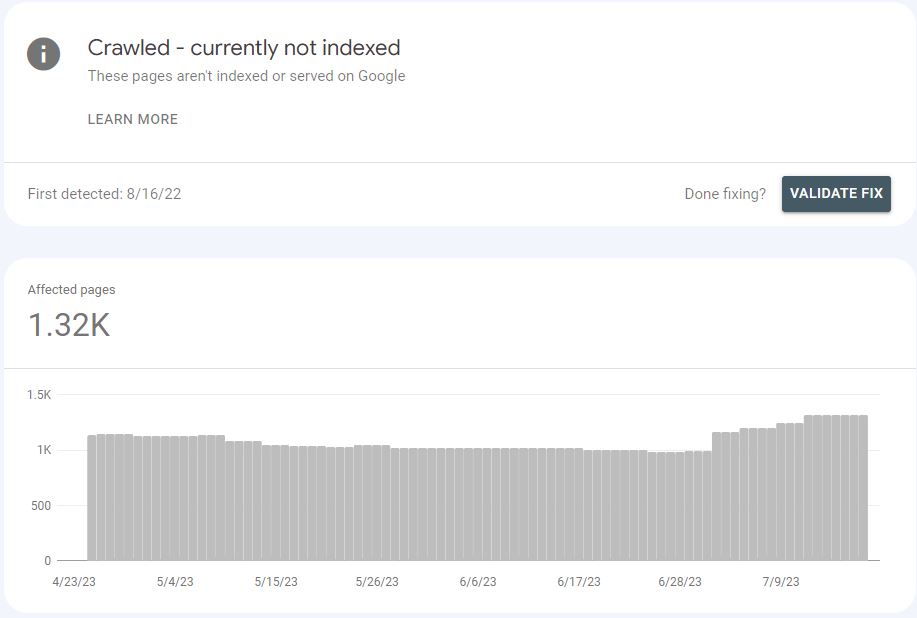
- Crawled, currently not indexed means Google fetched the page and chose not to store it, at least for now. This is usually an indexing and quality problem. Requesting indexing again rarely helps on its own. Improving the page, merging it with a stronger one, or linking to it from important pages usually does.
What is ranking in SEO?
Ranking happens at the moment someone searches. Google looks through its index for matching pages and orders them by what it judges most relevant and useful for that person. The same search can give different results in different cities, languages or devices, because location and context are part of the decision.
There’s no single score a page carries around. Google uses a set of ranking systems that weigh things like how well the page matches the search intent, how helpful and original the content is, links from trusted sites, page experience and freshness where it matters. I cover these in detail in my post on search engine ranking factors, and Google’s approach to trust in E-E-A-T and YMYL.
Two more things to know. Google says it doesn’t accept payment to crawl a site more often or to rank it higher in organic results. And an indexed page can still sit nowhere near page one if a dozen other pages answer the question better.
The same three steps also feed Google’s AI features. Google says a page needs to be indexed and eligible to show a snippet to appear as a supporting link in AI Overviews and AI Mode, and that no special markup is needed. So getting crawling and indexing right covers you there too.
How to tell which step a page is stuck on
- Run URL Inspection in Search Console. It tells you if the URL is on Google, when it was last crawled, whether crawling was allowed, and which canonical Google picked. Use “Test live URL” to see how Googlebot renders the page right now.
- Check the Page indexing report. Look for patterns in the “Why pages aren’t indexed” list: excluded by noindex, blocked by robots.txt, duplicates, soft 404s and the two “currently not indexed” statuses.
- Do a quick site: search. Typing
site:yourdomain.com/page-urlinto Google gives a rough check. It isn’t a complete list of indexed pages, so trust Search Console over it. My guide to Google search operators covers more checks like this. - Look at the Performance report. If the page is indexed and getting impressions but few clicks, or ranking on page three, it’s a ranking problem, not a technical one.
How to improve each step
Help search engines crawl your site
- Link to every important page from at least one other relevant page on your site.
- Keep an XML sitemap with only live, indexable URLs and submit it in Search Console and Bing Webmaster Tools.
- Review robots.txt after every launch or migration.
- Fix broken internal links and point redirects straight to the final URL.
- Keep your server fast and stable. Slow responses mean fewer pages crawled. My page speed impact tool shows what slow load times might be costing you in visitors too.
Help search engines index your pages
- Remove stray noindex tags from pages you want in search.
- Set canonical tags on duplicate or near-duplicate pages, and keep internal links pointing to the canonical version.
- Make sure key content is in the HTML or renders reliably for Googlebot.
- Merge or improve thin pages instead of publishing lots of near-identical ones.
- Add structured data where it fits. It helps search engines understand the page and can make it eligible for rich results, though it isn’t a ranking boost by itself.
These are the first things I look at in a technical SEO audit, because ranking work is wasted until pages can be crawled and indexed.
Help your pages rank
- Match the search intent. Look at what ranks now and match the format before trying to beat it.
- Answer the main question early, then go deeper than the other results with real examples and first-hand experience.
- Earn links from relevant, trusted sites and use clear internal links to your most important pages.
- Keep facts current on topics that change.
If your pages are indexed but stuck, my content SEO service is built around exactly this kind of improvement.
FAQ
What is the difference between crawling and indexing?
Crawling is when a search engine bot finds and downloads a page. Indexing is when the search engine analyzes that page and decides whether to store it in its database. A page can be crawled and still not be indexed.
Can a page be indexed without being crawled?
Partly. If a URL is blocked by robots.txt but other sites link to it, Google can index the URL without seeing its content. It usually shows with no description. That’s why noindex, not robots.txt, is the right way to keep a page out of search.
How long does it take Google to crawl and index a new page?
There’s no fixed time. It can be hours for a well-linked page on an active site, or weeks for a new site with few links. Linking to the page from pages that already get crawled, adding it to your sitemap and using URL Inspection to request indexing all help.
Does being indexed mean my page will rank?
No. Indexing only makes a page eligible to appear. Where it ranks depends on how well it answers the search compared with every other indexed page.
Is crawl budget something I need to worry about?
For most small and mid-sized sites, no. Google says crawl budget mainly matters for very large sites or sites with lots of pages that change daily. Fixing blocked, orphaned and duplicate pages matters far more for everyone else.
Not sure where your pages are getting stuck?
If important pages aren’t showing up in Google, the cause is usually one of a handful of fixable crawling or indexing problems. Get in touch and I’ll take a look. If you’re wondering what SEO support might cost, try the SEO cost calculator first.