
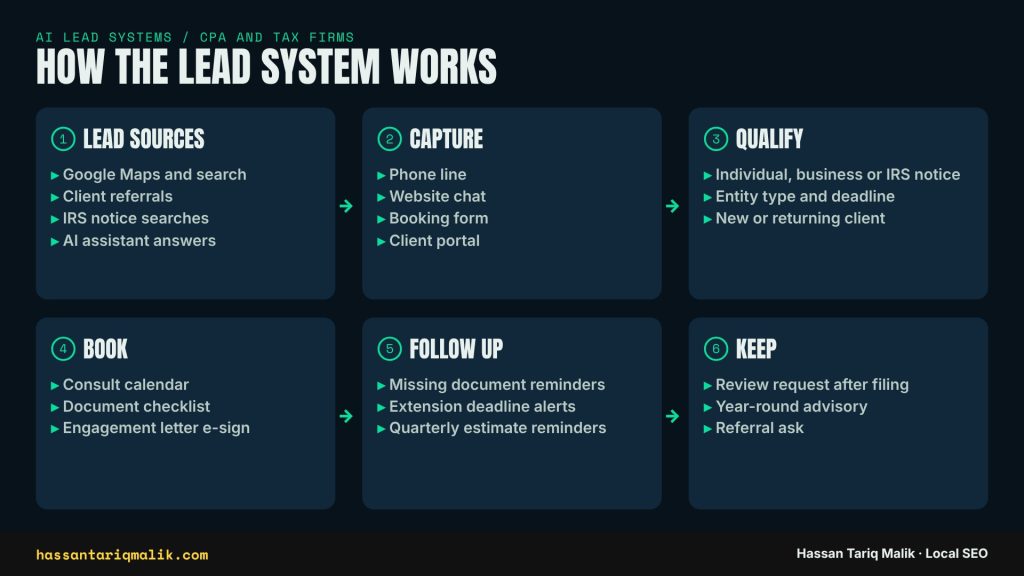
A CPA firm’s lead system is the path a prospect takes from searching for tax help on Google to signing your engagement letter, and it has six stages: lead sources, capture, qualify, book, follow up and keep. When I audit accounting firms, the firms that grow are rarely the ones with the most traffic. They are the ones where every stage has an owner and nothing falls between the cracks.
In this post I walk through each stage for an accounting or tax practice, show where AI voice and chat tools can help, mark the points where a person has to take over, and explain how the whole thing ties back to your Google Business Profile and local rankings.
Why a CPA firm needs a mapped lead system
Most firms I talk to track two things: rankings and phone calls. Nobody owns what happens in between. A caller who reaches voicemail on a Tuesday afternoon in February often calls the next firm in the map pack before you hear the message. A web form sent on a Sunday night sits in a shared inbox until Wednesday.
Tax work is also seasonal. Demand piles up from January to April, again before the October extension deadline, and whenever IRS notices go out. If the system only works when the office is quiet, it fails exactly when the most leads arrive.
Mapping the six stages gives you one simple view: where people come from, what happens to them, and where they drop off.
Stage 1: Where leads come from
For most accounting and tax firms, new clients arrive through four doors.
- Google Maps and search. People search ‘tax preparer near me’, ‘CPA for small business’ or ‘IRS letter help’ plus their city. The map pack takes a large share of those clicks.
- Client referrals. Still the strongest source for most firms, and the easiest to neglect because it feels like it runs on its own.
- IRS notice searches. Someone opens a CP2000 or a balance due letter and searches for help that evening. These leads are urgent and often high value.
- AI assistant answers. More people now ask ChatGPT, Gemini or Google’s AI features to recommend a local accountant. Those tools lean on your Business Profile, your reviews and how consistently your name, services and city appear across the web.
Each door needs something different. Maps needs the right primary category, a full services list and a steady flow of reviews. Referrals need a simple ask at the right moment. IRS notice searches need a page on your site that explains exactly what you do when a letter arrives. AI answers need your firm described the same way everywhere.
Stage 2: Capture
Capture covers every way a lead reaches you: the phone line, website chat, the booking or contact form, and the client portal for returning clients.
The weak spot is almost always the phone. In my experience the calls that get missed cluster in three windows: lunch, late afternoon during the season, and after hours. A prospect who calls two or three firms from the map pack tends to book with the first one that picks up or texts back.
Where AI helps at capture
- An AI receptionist can answer when staff can’t, take the caller’s name and reason for calling, and offer a consult slot.
- Missed-call text back sends a short text within a minute of a missed call with a booking link, so the caller has something to do other than call your competitor.
- Website chat can answer simple questions such as hours, services and which documents to bring, then hand over a booking link.
Where a person takes over
Anything that needs judgment goes to staff: a question about a specific return, a notice with a short deadline, or a returning client with a problem. The AI part of capture should be narrow on purpose. It gathers facts and books time. It does not give tax advice.
One note on chat. Google ended Business Profile chat in July 2024, so chat now has to live on your own website or in a tool you control. If an old profile setting or an article still tells people to message you on Google, update it.
Stage 3: Qualify
Finding out a lead is not a fit after a 45-minute consult wastes time on both sides. Three questions sort most tax leads:
- Individual, business or IRS notice? This decides who calls back.
- What is the entity type and the deadline? An S corporation with a March deadline, a sole proprietor with a quarterly estimate, or a notice with a 30-day response window are very different jobs.
- New or returning client? Returning clients go to their usual preparer. New clients get the intake flow.
Whoever answers first, a person, a chat window or an AI receptionist, should ask the same questions in the same order. Write them down as a short script. When the questions are consistent, the answers become data you can count: how many notice cases came in this month, how many business returns, how many were out of scope.
Notice cases with short deadlines go to the top of the callback list. Out-of-scope requests, for example a lead who needs payroll services you don’t offer, get a polite answer and, if you have one, a referral.
Stage 4: Book
A lead who says ‘I’ll call back to book’ often doesn’t. The fix is to book on the first contact, whoever or whatever takes it.
That needs three pieces in place:
- A consult calendar that staff, the website and any AI tool can all see, with real open slots rather than a request form.
- A document checklist sent the moment the slot is confirmed, matched to the lead type: individual, business or notice.
- An engagement letter the client can sign online before the meeting, so the first consult is spent on the work and not on paperwork.
When booking works, clients arrive with the right papers and fewer first meetings go to waste. It is also the stage where I see the biggest gap between firms. Two firms can get the same number of calls and end up with very different numbers of signed engagements.
Stage 5: Follow up
The busiest weeks of the year are exactly when follow-up slips. Clients forget documents, extensions get missed and quarterly estimates catch people by surprise.
Three automated messages cover most of it:
- Missing document reminders when an upload is still outstanding a few days before the appointment.
- Deadline alerts ahead of the extension deadline and each quarterly estimate.
- A check-in for undecided leads who had a consult but haven’t signed.
These run from your CRM or practice management software by email or registered business text. One firm rule: never ask for tax documents by text or email attachment. Uploads go through your secure portal, and every message should say so.
Stage 6: Keep
The last stage turns this season’s clients into next season’s referrals and reviews.
- Review request after filing. The best moment to ask is the day the return is filed and the relief sets in. Send a direct link to your Google review form.
- Year-round advisory. Planning check-ins between seasons keep you in touch and smooth out your workload.
- Referral ask. A short, specific ask works better than a general ‘we love referrals’ line. For example: ‘If a friend gets an IRS letter this year, send them our way.’
When you reply to reviews, thank the client by first name and keep it general. Never mention their return, refund, notice or anything about their finances, even if they did in the review.
How the lead system connects to Google Maps and local SEO
This is where the stages loop back to your rankings. Google ranks local results on relevance, distance and prominence. Several parts of the lead system feed those signals directly.
- Reviews from Stage 6 build prominence and give Google and searchers words to match, such as ‘small business taxes’ or ‘IRS notice’.
- Answered calls from Stage 2 mean fewer frustrated searchers and fewer one-star reviews that say ‘nobody ever picks up’.
- Service pages for each lead type from Stage 3, such as individual returns, business returns and IRS notice help, give Google relevant pages to rank and give your Business Profile services something to link to.
- Tracking ties it together. Add UTM tags to your profile’s website and appointment links so you can see in GA4 which bookings started on Maps.
A practical example. If your profile lists ‘Tax preparation service’ as the primary category, has separate services for individual, business and notice work, links each service to a matching page, and every one of those pages has a booking button that opens the same calendar, then a searcher can go from the map pack to a booked consult in under two minutes. That is the whole system working as one.
Rules to know
These are the rules I see accounting firms run into when they add AI calls, chat or texting. I checked each one against the primary source this week. This is general information, not legal advice; your own compliance adviser should confirm what applies to your firm.
- FTC Safeguards Rule. Tax preparers count as financial institutions under the Gramm-Leach-Bliley Act and must keep a written information security program. Any phone, chat or texting vendor that touches client data belongs in it. See the FTC Safeguards Rule guide.
- IRS Publication 5708. The IRS and the Security Summit published a written information security plan (WISP) template for tax professionals. It is a good starting point if your firm doesn’t have one. See IRS Publication 5708 and the IRS reminder on WISPs.
- AI voices and the TCPA. In February 2024 the FCC ruled that AI-generated voices count as ‘artificial’ voices under the Telephone Consumer Protection Act. Outbound calls that use an AI voice need the person’s prior express consent. Answering inbound calls is different, but any AI callback or reminder call falls under the rule. See the FCC declaratory ruling.
- A2P 10DLC registration. US carriers require businesses that text from a standard local number through software to register their brand and messaging campaign. Unregistered traffic gets filtered or blocked. Your texting provider handles the filing; see an example of the registration process. Collect opt-in and honor STOP replies.
- Google Business Profile chat ended. Google turned off Business Profile chat and call history in July 2024. Chat now belongs on your own website. See Google’s help page on the change.
A simple way to start
You don’t need to build every stage at once. I’d go in this order:
- Call your own firm from a mobile phone at 12:30 and at 4:45 on a weekday and see what happens.
- Write the three qualifying questions down and give them to everyone who answers the phone.
- Put a real booking calendar on your site and link it from your Business Profile.
- Add a review request on the day each return is filed.
- Only then look at AI answering or missed-call text back for the gaps you found in step 1.
FAQs
Can an AI receptionist give tax advice to callers?
No. I’d keep it to taking details, answering office questions and booking consults. Anything about deductions, balances or notices goes to a person.
Should my firm collect Social Security numbers over the phone or by text?
No. Sensitive numbers and tax documents belong in your secure client portal, and that rule should be written into your security plan.
Do I need consent to send appointment reminders by text?
Yes, collect opt-in when the client books, register your number for A2P 10DLC through your provider, and honor STOP replies.
How does this help my Google Maps ranking?
Answered calls, steady reviews and service pages that match each lead type all feed the relevance and prominence signals Google uses for local results.
If you want to see how your firm shows up on Google Maps before the season starts, book a free local SEO audit.